Server
servers. server computer. hardware server. software server. web server. server program. data center. rack server. what is a server. what does a server computer look like. is a server a computer or a program. is a server different from my laptop. why do servers stay on all the time. what is a web server
⏱ 6 min read
In one sentence: A server is a program that answers requests from clients, and the word also means the computer that runs such programs, which is usually kept running day and night.
Why should I care?
In Client and Server, you learned that a server is a program that waits for requests and answers them. When you open a web page, a server program on a real computer, somewhere in the world, sends it to you.
People call that computer a server too. When you put your own website online, your files will live on one of these computers.
Analogy
Go back to the library. The librarian at the help desk is like a server program: the one who answers. The library building is like the server computer. One building can have several desks, each with its own librarian. In the same way, one server computer can run several server programs.
Where the analogy breaks down: a library closes at night, and its librarians go home. A server computer is usually kept running all day and all night. Also, a building does no work, but a server computer does: its CPU follows the server programs' instructions.
How it actually works
Two meanings of one word
MDN, a website that documents how the web works, says a server can be "software or hardware". Software means programs. Hardware means the physical machine.
- A software server is a program that answers requests from clients. Wikipedia says that, in its narrowest meaning, the word "server" means this program.
- A hardware server is a computer that runs one or more server programs. MDN calls it "a shared computer on a network, usually powerful".
Inside a server computer
A server computer is built from the parts you met in How the Parts Work Together. It has a CPU, memory (RAM) and Storage: HDD and SSD. It also has a connection to a network. MDN says a web server computer stores the server software and the website's files, and connects to the internet.
Wikipedia even says "a laptop or a personal computer can host a web server". (Here, host is a verb: to run a program or keep files for others. It is a different use of the word from "a host on a network".)
But server computers are often different from your laptop:
- No screen or keyboard. Wikipedia says that servers are usually reached over a network, so many run "without a computer monitor". People manage them from other computers, through the network.
- Flat boxes in racks. Wikipedia says server cases "are usually flat and wide". They are made to fit in a rack: a standard frame that holds many electronic devices.
- Data centers. MDN says a hardware server is often kept in a data center, a place that houses computer systems.
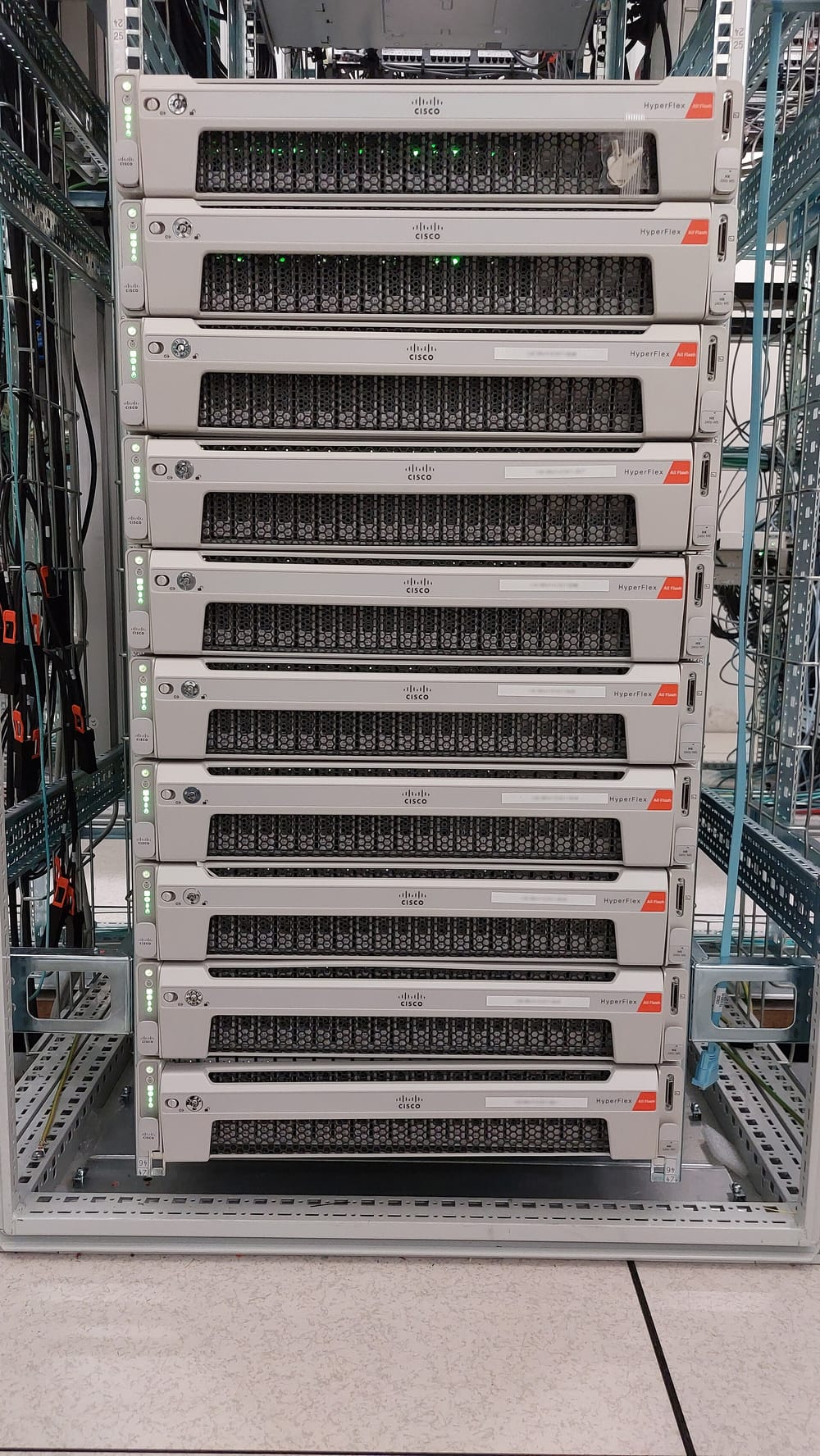 ServerRack

This diagram shows one server computer, with its parts and its programs, and the clients that send it requests:
Many programs, many clients
MDN says that several server programs can run on the same machine. Wikipedia names some kinds, such as mail servers and web servers. A web server program sends web pages. One example is the Apache HTTP Server.
Wikipedia also says "a single server can serve multiple clients". And a website that looks like one server to you may be many computers. MDN says a server "appears as only a single machine", but it may be a group of servers sharing the work.
(This is simplified. How a request reaches the right computer, and the right program on it, is a later topic.)
Why servers stay on
A client can send a request at any moment. If the server computer is off, nobody answers. A dedicated web server is a computer used only for this job. MDN says it is always connected to the internet, except at times when it is not working, such as when it has problems.
How it came to be
The first web server ran at CERN, a laboratory where scientists from around the world study the Universe. CERN's history says that by the end of 1990, Tim Berners-Lee had the first web server and browser working there. Tim Berners-Lee, a British scientist, invented the World Wide Web (the system of linked pages that you reach through the internet).
The server was a NeXT computer, which he kept in his office. CERN says that, to stop it from being switched off by accident, it had a hand-written label in red ink: "This machine is a server. DO NOT POWER IT DOWN!!"
🧪 Try it in your browser
You will look at notes that a server adds to its answer. These notes are called headers: short lines of information sent with the response, before the page itself. You need a computer, not a phone. This only looks and changes nothing.
- In Chrome, Edge or Firefox, open
https://example.comin a new browser tab. - Open the developer tools: a panel of tools built into the browser. (The console you may have used before is one part of it.)
- Windows: press
F12orCtrl+Shift+I. IfF12does nothing, try the other keys. - Mac: press
Cmd+Option+I.
- Windows: press
- At the top of the panel, click the word Network. (In Edge, if you do not see it, click the More tools button first.) The list is empty at first.
- Click your browser's Reload button. Rows appear in the list. You will see many words you do not know. That is fine.
- Click the first row. It is usually the page itself. Its name may be
example.com, or only a slash:/. - In the details that open, click Headers if it is not already chosen. Then find the Response Headers section.
What you should see: a list of lines, each with a name and a value. Find the line named date (it may be written Date). Its value looks like Tue, 29 Oct 2024 16:56:32 GMT, but with a different day and time. You may also see a line named server.
What happened: a server program, on a server computer somewhere, made this answer and wrote these notes. MDN says the date line holds "the date and time at which the message originated", that is, when the answer was made. The time may not match your clock. HTTP dates are always in GMT (Greenwich Mean Time), never in your local time. The server line, when a site includes it, names the server software. Close the browser tab when you are done.
Common misunderstandings
- "A server is a giant, special machine." Not always. Many are powerful, but a laptop can run a web server too.
- "One website lives on one computer." Not always. A website may be served by many computers sharing the work.
Recap
- "Server" means a program that answers clients' requests, and also the computer that runs such programs.
- A server computer has a CPU, RAM, storage and a network connection, like other computers, but often no screen. Many sit in racks in data centers.
- Servers are usually kept running day and night, so they can answer requests at any time.
Sources
- MDN Web Docs, Server (glossary): https://developer.mozilla.org/en-US/docs/Glossary/Server
- MDN Web Docs, What is a web server?: https://developer.mozilla.org/en-US/docs/Learn_web_development/Howto/Web_mechanics/What_is_a_web_server
- MDN Web Docs, An overview of HTTP: https://developer.mozilla.org/en-US/docs/Web/HTTP/Guides/Overview
- MDN Web Docs, Date header: https://developer.mozilla.org/en-US/docs/Web/HTTP/Reference/Headers/Date
- MDN Web Docs, Server header: https://developer.mozilla.org/en-US/docs/Web/HTTP/Reference/Headers/Server
- Wikipedia, Server (computing) (general background reference): https://en.wikipedia.org/wiki/Server_(computing)
- Wikipedia, 19-inch rack: https://en.wikipedia.org/wiki/19-inch_rack
- Wikipedia, Data center: https://en.wikipedia.org/wiki/Data_center
- Apache HTTP Server Project: https://httpd.apache.org/
- CERN, A short history of the Web: https://home.cern/science/computing/the-birth-of-the-web/short-history-web/
- Chrome for Developers, Open Chrome DevTools: https://developer.chrome.com/docs/devtools/open
- Chrome for Developers, Network features reference: https://developer.chrome.com/docs/devtools/network/reference
- Microsoft Edge DevTools, Keyboard shortcuts: https://learn.microsoft.com/en-us/microsoft-edge/devtools/shortcuts/
- Microsoft Edge DevTools, Inspect network activity: https://learn.microsoft.com/en-us/microsoft-edge/devtools/network/
- Firefox DevTools User Docs: https://firefox-source-docs.mozilla.org/devtools-user/index.html
- Firefox DevTools User Docs, Network request details: https://firefox-source-docs.mozilla.org/devtools-user/network_monitor/request_details/index.html
Written with AI · Reviewed by AI · Not yet checked by a human
Found a mistake, or something you did not understand? Report a problem.