Router
router. routers. routing. routing table. forwarding table. hop. next hop. time to live. TTL. default route. gateway. home router. traceroute. what is a router. what does a router do. what is the difference between a router and a switch. how does a packet find its way across the internet. is my wi-fi box a router. what is a hop
⏱ 7 min read
In one sentence: A router is a device that connects networks to each other and passes each packet on, one step closer to the IP address it is going to.
Why should I care?
In IP Address, you saw that every packet carries a destination address. But your device does not know the way to every computer in the world. A router chooses where each packet goes next.
You probably have a box at home called "the router". And the Packets of a web page usually pass through many routers on their way to you.
Analogy
Think of the sorting centers of a postal service. A letter goes from one sorting center to the next. At each one, a worker reads the address. The worker does not plan the whole trip. They send the letter on to the next center that is closer to the address.
A router does the same with packets.
Where the analogy breaks down: a sorting center looks at a city or a country. A router reads the whole IP address and compares its first part with a list of directions. And routers keep their directions up to date by sending messages to each other. Sorting centers do not do that.
How it actually works
A switch and a router
In What is a Network?, you met the switch. It connects devices inside one network, and it remembers where each device is.
Imagine the whole world as one network, joined only by switches. MDN, a website about the web, explains the problem: with ten billion computers, each switch would need to remember up to ten billion device addresses. So computers are divided into separate local networks. A router is connected to two or more of these networks, and joins them.
The routing table
An IP address has a prefix: its first part, which a whole group of addresses shares. So a router keeps directions for groups of addresses, not for every single computer. This list is the routing table (or forwarding table).
Diagram: a simplified routing table with four rows. Each row matches a group of addresses and names where to send the packet.
 If the destination address starts with...   send the packet to...
 ------------------------------------------  -------------------------
 142.250                                      router B
 142.250.190                                  router C
 192.168.1                                    straight to the computer,
                                              in this local network
 anything else (the "default route")          the internet provider's
                                              router
Take the address 142.250.190.78. It matches two rows: 142.250 and 142.250.190. The router uses the most specific row, with the longest matching prefix: router C. The default route is used only when no other row matches.
(This is simplified. Real routing tables count the prefix in bits, so it does not always end at a dot.)
What a router does with each packet
- A packet arrives. The router reads the destination IP address in its header.
- It looks up that address in its routing table and chooses the next hop: the next router, or the destination computer itself.
- It lowers the packet's time to live number (see below) and sends the packet on.
Each step from one device to the next is called a hop.
Time to live
Every IPv4 packet header holds a number called the time to live (TTL). It is 8 bits long, so it can be at most 255. (In IPv6, it is called the hop limit.) Despite its name, it works mostly as a limit on the number of hops. Each router must lower it by at least one. At zero, the router throws the packet away and sends an error message back to the sender.
Why? A mistake in the routing tables could send a packet around in a circle. RFC 1812, the rules for routers, says the TTL stops packets from looping forever.
How routers learn the way
RFC 1812 says the routing table should change when the network changes. Routers on the internet normally learn their directions by exchanging messages with other routers. The rules for these messages are routing protocols, such as BGP (Border Gateway Protocol).
The box at home
MDN says the box called a "router" in a home is likely a switch, a router and a modem in one device. (A modem connects your network to the lines outside, such as telephone lines.)
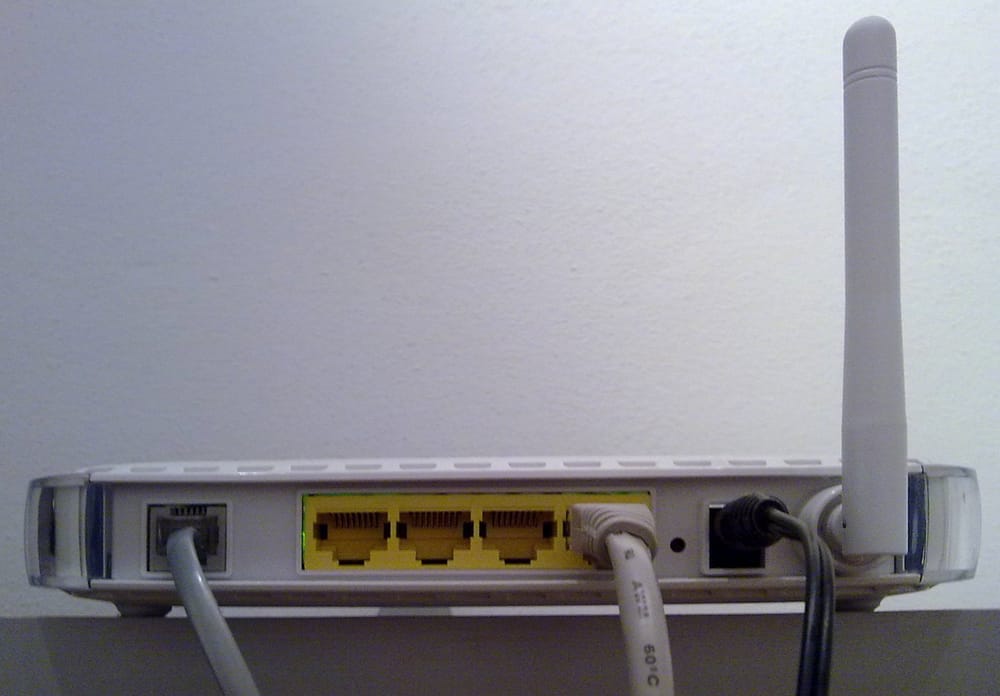 Phone lineSwitch

The home router connects your home network to an Internet Service Provider (ISP), a company that manages routers. It often also does the NAT you met in IP Address.
How it came to be
You do not need to remember these names and dates.
In 1967, at a meeting of ARPA researchers, Wesley Clark suggested a plan for the network that became the ARPANET. Connected Interface Message Processors (IMPs), placed between the main computers and the network, would manage it. The Computer History Museum says: "Called IMPs, they evolve into today's routers."
In December 1968, a group led by Frank Heart at the company Bolt Beranek and Newman (BBN) won the project to build them. BBN installed the first IMP at UCLA in September 1969.
Later, Bob Kahn began planning how to join different networks. This work led to TCP/IP, with Vint Cerf. Kahn's plan used machines that, says the Internet Society history, "would later be called gateways and routers".
🧪 Try it in your browser
A tool called traceroute lists the routers on a packet's path. It sends packets with a time to live of 1, then 2, then 3, and so on. Each router that throws one away sends back an error message, which shows which router it was. The destination computer sends a different message, so traceroute knows it arrived.
Traceroute usually needs a command line (a window where you type commands), so you will read a real result from 1997.
- Open RFC 2151, section 3.4. On a phone, you may need to scroll sideways.
- Find the line that contains
traceroute www.hill.com. On a computer, pressCtrl+F(Mac:Cmd+F) and typetraceroute www. - What you should see: 17 numbered lines below it. (Two long lines wrap.) Each line is one hop. Lines 1 to 16 are routers, and line 17 is the destination computer,
syrup.hill.com. Each shows a name (or only a number), an IP address in round brackets( ), and three times in ms (milliseconds: thousandths of a second). Each time is one trip there and back. - Read the numbered notes above these lines. Both computers were in one town, Colchester, Vermont, in the United States, but used different ISPs. The packet traveled through cities including New York, Washington, D.C., Chicago and San Jose, California.
Common misunderstandings
- "A router knows the whole path to every computer." No. It knows directions for groups of addresses, and it chooses only the next hop.
- "A router and a switch are the same thing." No. A switch works inside one network. A router joins networks. Your home box usually contains both.
- "My home router is the internet." No. It is only the first hop of many.
Recap
- A router connects networks and passes each packet on, one hop closer to its destination IP address.
- It uses a routing table: directions for groups of addresses that share a prefix, plus a default route.
- Each router lowers the packet's time to live, so packets cannot travel in circles forever.
Sources
- MDN Web Docs, How does the Internet work?: https://developer.mozilla.org/en-US/docs/Learn_web_development/Howto/Web_mechanics/How_does_the_Internet_work
- MDN Web Docs, Router (glossary): https://developer.mozilla.org/en-US/docs/Glossary/Router
- RFC 1812, Requirements for IP Version 4 Routers (1995): https://www.rfc-editor.org/rfc/rfc1812
- RFC 791, Internet Protocol (1981): https://www.rfc-editor.org/rfc/rfc791
- RFC 8200, IPv6 Specification (2017): https://www.rfc-editor.org/rfc/rfc8200
- RFC 2151, A Primer On Internet and TCP/IP Tools and Utilities (1997): https://www.rfc-editor.org/rfc/rfc2151.html
- RFC 3022, Traditional IP Network Address Translator (2001): https://www.rfc-editor.org/rfc/rfc3022
- Computer History Museum, Internet History, 1960s: https://www.computerhistory.org/internethistory/1960s/
- Internet Society, A Brief History of the Internet: https://www.internetsociety.org/internet/history-internet/brief-history-internet/
- NIST, Metric (SI) Prefixes: https://www.nist.gov/pml/owm/metric-si-prefixes
- Wikipedia, Router (computing) (general background reference): https://en.wikipedia.org/wiki/Router_(computing)
- Wikipedia, Netgear DG834 (for the photo of the home router): https://en.wikipedia.org/wiki/Netgear_DG834
Written with AI · Reviewed by AI · Not yet checked by a human
Found a mistake, or something you did not understand? Report a problem.